WhatsApp Automation for Small Businesses: A Simple Guide
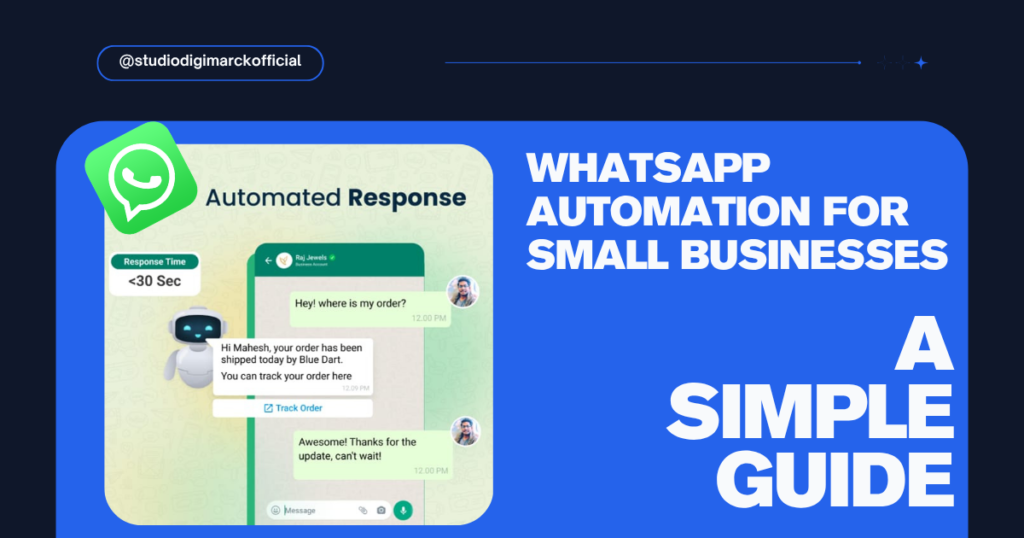
For many small businesses, WhatsApp is more than just a messaging app. and It has become one of the easiest ways to talk to customers, answer questions, share product details, send offers, and generate sales. But there is one common problem: managing every WhatsApp message manually takes a lot of time. This is where WhatsApp automation for small businesses can help.
However, With the right automation, businesses can automatically respond to common questions, send follow-ups, share important information, and keep customers engaged without replying to every message manually.
For small businesses in Vadodara and across India, WhatsApp automation can be a simple way to improve customer communication and save valuable time.
What Is WhatsApp Automation?
WhatsApp automation means using tools and predefined workflows to automatically handle certain customer conversations on WhatsApp.
For example, when a customer sends: “What is the price?”
Instead of waiting for someone from your team to reply, an automated message can immediately provide pricing information or ask the customer what product or service they are interested in.
However, Automation does not mean removing humans from customer communication. Instead, it helps your team handle repetitive tasks while they focus on conversations that actually need personal attention.
Why Is WhatsApp Automation Important for Small Businesses?
Small businesses often have limited staff and limited time.
One person may be handling sales, customer support, marketing, and follow-ups at the same time. Because of this, customer messages can sometimes be missed or answered late.
For example, WhatsApp automation can help solve some of these problems.
1. Faster Customer Responses
Customers usually don’t want to wait hours for a simple answer.
Automated replies can instantly acknowledge a customer’s message and provide basic information such as:
- Business hours
- Product or service details
- Pricing information
- Location
- Frequently asked questions
- Booking or enquiry options
A faster response can also create a better first impression.
2. Never Miss an Enquiry
Imagine receiving 20 or 30 enquiries in a day.
It is easy to forget to reply to one of them, especially when your team is busy.
With WhatsApp automation, you can create a system where new enquiries are automatically recorded, acknowledged, and moved into a follow-up process.
This can help reduce the chances of losing potential customers.
3. Automate Customer Follow-Ups
One of the biggest benefits of automation is follow-up.
Many customers don’t buy immediately. They may ask for information today and make a decision after a few days.
Instead of relying completely on memory, businesses can create follow-up messages such as:
Day 1: Thank you for your enquiry.
Then,
Day 3: Just checking if you have any questions about our product or service.
Day 7: We’re here if you need any further information.
The exact timing should depend on the business and customer journey, but the idea is simple: follow up consistently without manually remembering every customer.
4. Save Time
Your team shouldn’t have to type the same message 50 times every day.
Common questions can be handled automatically, allowing your team to spend more time on sales, customer relationships, and other important work.
5. Improve Lead Management
WhatsApp can become much more useful when it is connected to a proper lead management process.
For example:
New Enquiry → Qualified Lead → Follow-Up → Interested → Converted
This gives your business a clearer idea of where every customer is in the buying process.
How Can Small Businesses Use WhatsApp Automation?
WhatsApp automation is useful for many different types of businesses.
Local Service Businesses
Salons, gyms, repair services, consultants, clinics, and other service businesses can use automation to handle appointment enquiries, service questions, reminders, and follow-ups.
Retail Businesses
Retailers can use WhatsApp to share product information, answer frequently asked questions, send offers, and update customers about orders.
Real Estate Businesses
Real estate businesses can use automation to collect basic information from potential buyers or tenants and share property details.
Restaurants and Cafes
Restaurants can use WhatsApp automation for enquiries, menus, offers, reservations, and order-related communication.
B2B Businesses
Manufacturers, wholesalers, distributors, and other B2B businesses can use WhatsApp to manage enquiries, share catalogues, and follow up with potential buyers.
A Simple WhatsApp Automation Workflow
A small business doesn’t need a complicated system to get started.
A basic workflow can look like this:
Step 1: Customer sends a WhatsApp message
↓
Step 2: Automatic welcome message
↓
Step 3: Customer selects what they need
For example:
- Product Information
- Pricing
- Book a Service
- Talk to a Team Member
↓
Step 4: Automated information is provided
↓
Step 5: Customer becomes a qualified enquiry
↓
Step 6: Sales team takes over
↓
Step 7: Follow-up messages are scheduled
This creates a simple system where automation handles repetitive communication and your team handles important conversations.
WhatsApp Automation vs Manual Replies
Manual WhatsApp communication can work when you have only a few enquiries.
But as your business grows, managing every conversation manually becomes difficult.
| Manual WhatsApp | WhatsApp Automation |
|---|---|
| Requires constant manual replies | Handles repetitive replies automatically |
| Follow-ups can be missed | Follow-ups can be scheduled |
| Difficult to manage many enquiries | Easier to manage larger enquiry volumes |
| More time-consuming | Saves time |
| Depends heavily on staff availability | Works according to predefined workflows |
Automation isn’t necessarily better for every single conversation. Personal communication is still important, especially when a customer has a specific question or is close to making a purchase.
The best approach is usually automation + human support.
Is WhatsApp Automation Expensive?
Not necessarily.
The cost depends on the type of automation, the tools being used, the number of conversations, and how advanced the workflow needs to be.
A small business can start with simple automation such as:
- Welcome messages
- FAQs
- Quick replies
- Lead collection
- Basic follow-ups
As the business grows, more advanced workflows can be added.
The goal should not be to automate everything.
The goal should be to automate repetitive tasks that take unnecessary time.
Common Mistakes Businesses Make With WhatsApp Automation
Automation can be helpful, but poor automation can frustrate customers.
Here are some mistakes to avoid:
Making Every Message Robotic
Customers still want to feel like they are talking to a real business.
Keep automated messages short, clear, and natural.
Sending Too Many Messages
Don’t keep sending promotional messages just because automation makes it easy.
Only send messages that are useful and relevant.
Not Giving Customers a Human Option
Customers should have an easy way to speak with a real person when needed.
Automating Without a Strategy
Simply setting up automatic messages does not guarantee more sales.
Your automation should be connected to your overall sales and marketing process.
How WhatsApp Automation Can Help Increase Sales
WhatsApp automation does not automatically create sales.
But it can improve the process that leads to sales.
For example:
More enquiries → Faster response → Better follow-up → More conversations → More opportunities to convert
This is particularly useful for businesses that already receive enquiries through Instagram, Facebook, Google, websites, or advertisements.
Instead of letting those leads disappear after the first message, a structured WhatsApp process can help businesses stay connected with potential customers.
Should Your Small Business Use WhatsApp Automation?
If your business receives regular WhatsApp enquiries, answers the same questions repeatedly, or struggles to follow up with potential customers, automation is worth considering.
You don’t need a complicated system from day one.
Start with the tasks that consume the most time, automate them, and gradually improve the process.
For small businesses in Vadodara, this can be especially useful because WhatsApp is already a familiar communication channel for many local customers and businesses.
Final Thoughts
WhatsApp automation is not about replacing human communication.
It is about making customer communication faster, more organised, and easier to manage.
From instant replies and lead collection to follow-ups and customer support, even simple automation can save time and improve the customer experience.
If you’re a small business owner, start by identifying the repetitive WhatsApp tasks your team handles every day.
Those are usually the best places to start with automation.
Need help building a WhatsApp marketing and automation system for your business?Then, Studio Digimarck helps businesses improve their digital presence with AI-powered marketing, social media management, content strategy, and performance marketing.
Then, Need to know about : How Branding Increases Pricing Power: Why Strong Brands Can Charge More

Leave a Reply